Calendalis · our own product
MatureIn everyday use on several websites or with several clients, with documentation and updates.All packages with status →
Let people book online. All appointments in one calendar.
Your patients or customers pick a free slot on your website. You see it in your calendar right away.
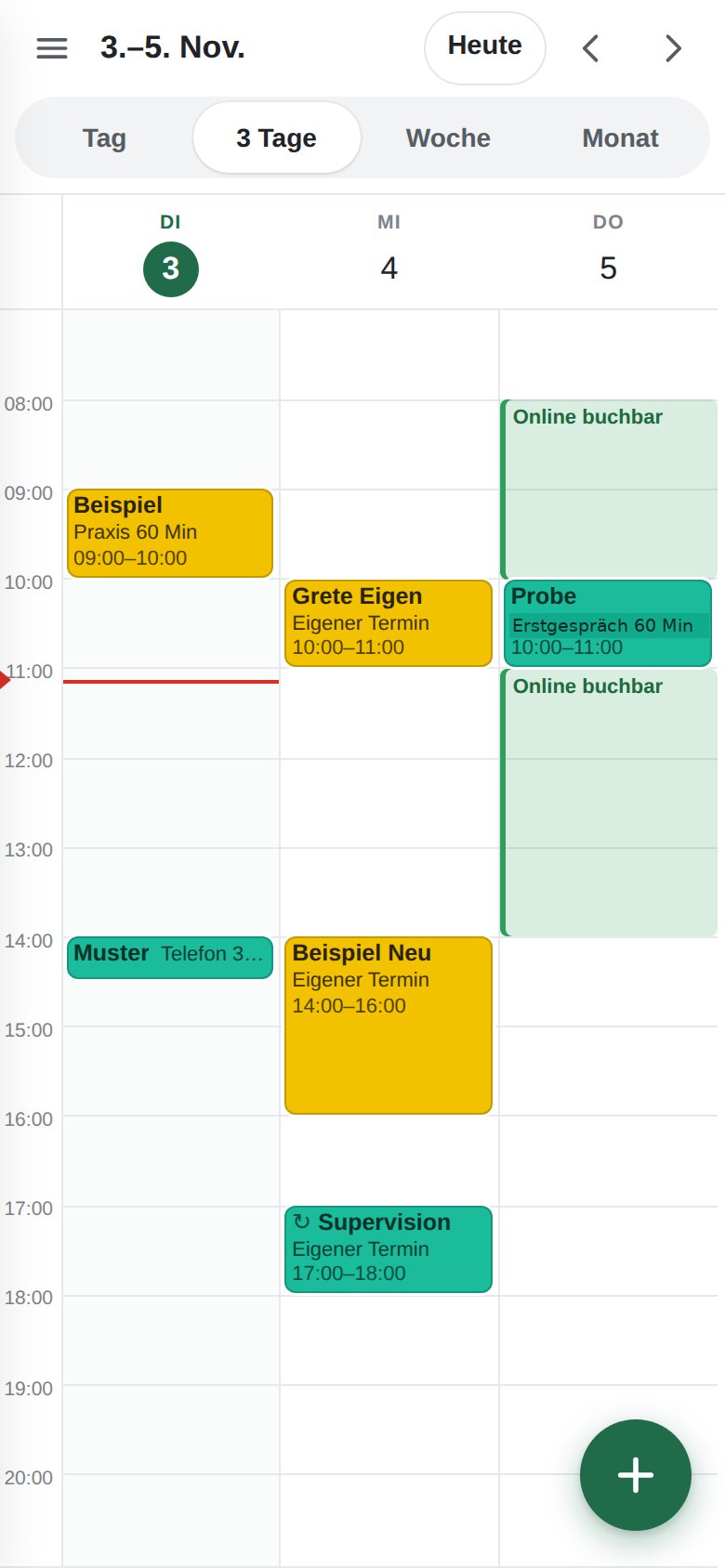
Next to the online bookings sit the appointments you enter yourself – all in one calendar on desktop and phone. Confirmation, cancellation, rebooking and reminders go out automatically by email, from your address.
- Booking page on your website
- Own calendar on desktop and phone
- Reminder 24 hours ahead
- Servers in Germany

The images show sample data.
Who it is for
Practices, consultants, retail
Practices and therapists
Treatment on site, phone or video consultation, different durations, two websites with one calendar.
Consultants, law firms, coaches
First consultation bookable online, appointments with video link, reminder a day ahead.
Retail and trades
Showroom appointment, delivery window or installation date after the order. At a Berlin furniture retailer, customers pick their delivery window themselves.
What Calendalis does
For your patients and customers – and for you
For your patients and customers
- Booking page on your website, in your colours, in German or English
- Appointment types with their own duration: practice 60 minutes, phone 30 minutes, video, first consultation
- Only show days with real availability
- Confirmation by email right away, with a calendar entry to save
- Cancel and rebook via a link in the email
- Reminder 24 hours before the appointment
For you
- One calendar for everything: online bookings and your own entries, colour-coded by type
- Month, week, day – on desktop and as an app on the phone
- Release or block free slots for online booking with one click
- Move appointments: the patient automatically gets the new time
- Two or more websites, one calendar, no double booking
- Reminders for your own entries too, as soon as an email address is attached
- Emails come from your practice, replies land in your inbox
How it gets onto your website
Three ways, we build it in
Button or link
“Book an appointment” in your menu or on the contact page – the quickest way.
Embedded
The booking calendar appears directly on your page, loaded only after a click (privacy).
Plugin
In progress for WordPress, Shopware and Joomla: bookings and calendar right in your website's backend.
We take care of the installation on any website, even if we did not build it.
Set-up
Ready in three steps
Appointment types, durations, opening hours, which emails go to whom.
Account, booking page, calendar, emails in your name, installation on the website, test booking with you.
Desktop and phone, plus a short written guide. After that: changes on request.
What it costs
Two packages, cancellable monthly
Calendalis Booking
one-off set-up €149
- Booking page + installation on the website
- Confirmation, cancellation, rebooking by email
- Reminder 24 hours ahead
- Emails from your address
- Own calendar on desktop and phone
- Own entries, blocking, releasing slots with a click
- Several websites, one calendar
- Calendar access via CalDAV
Calendalis Practice
one-off set-up €249
- Everything in Calendalis Booking
- Own calendar on desktop and phone
- Own entries, blocking, releasing slots with a click
- Several websites, one calendar
- Calendar access via CalDAV (Nextcloud, Apple, Thunderbird)
- Reminders for your own entries too
All prices net, cancellable monthly. Additional staff calendars and locations on request. For comparison: US scheduling tools cost around €10 per user and month without a practice calendar and without set-up, practice management systems over €100 a month.
Frequently asked
What practices want to know beforehand
Where is the data stored?
On our own servers at Hetzner in Nuremberg. No US services, nightly backup. You receive a data processing agreement from us.
Can I keep using my current calendar?
Yes, the practice calendar can be added to Apple Calendar, Thunderbird or Outlook. Private calendars stay out.
What happens when I enter an appointment myself?
It blocks the slot for online booking. The patient gets no confirmation, only the reminder if you add their email address.
What about double bookings?
Every slot can be booked only once, whichever website it comes from or whether you filled it yourself.
Can I set buffers and lead time?
Yes: minimum lead time, breaks between appointments, how far ahead bookings are allowed, how many per day.
What does a later change cost?
Appointment types, hours and email texts are changed within the subscription, at no extra charge.
In use
How it runs today
Naturopathic practice in Berlin
On-site and online consultations, two websites, one calendar. The practitioner enters her own appointments on the phone and releases free slots for booking with a click.
Furniture retailer in Berlin
Customers pick their delivery window themselves, the booking lands as a stop in the retailer's logistics app.
Calendalis for your practice
In two working days your patients book online.
Tell us briefly which appointment types you offer. We get back to you the same working day with price and date.
This email address is being protected from spambots. You need JavaScript enabled to view it. - WhatsApp +49 179 7779300
- +49 30 84523850


